
Start with the process
List the trigger, data, decisions and expected outcome before selecting tools.
ONE-TO-ONE LEARNING WITH DEEPAK
Learn n8n workflows one-to-one with Deepak Chandra. Map a task, connect apps, work with data, test failures and launch an agreed practical automation.
Start Learning With Me
SEE THE PROCESS
Watch the steps, then select one to explore what we work on together.
Start with a form, webhook, schedule or manual trigger and inspect its input.
Illustration only. Uses sample data; no real account, payment or message is triggered.
Learn the logic behind automations while building a practical flow live with me. We start with the task, not a screen full of nodes.
List the trigger, data, decisions and expected outcome before selecting tools.
Connect steps, map data and see why each node is needed.
Handle missing information, failed connections and repeated executions.
YOUR PRACTICAL ROADMAP
Follow the data through each node. Select a node to inspect the learning step.
STEP 01 / 10
Write down what starts the task, the information it needs and the result you want. Separate automatic actions from decisions that need a person.
The actual workflow is agreed around your goal. Paid providers or WhatsApp integrations may need separate approval and setup.
Inside n8n
Real screenshots from n8n’s first-workflow tutorial show how connected nodes and expressions work together.
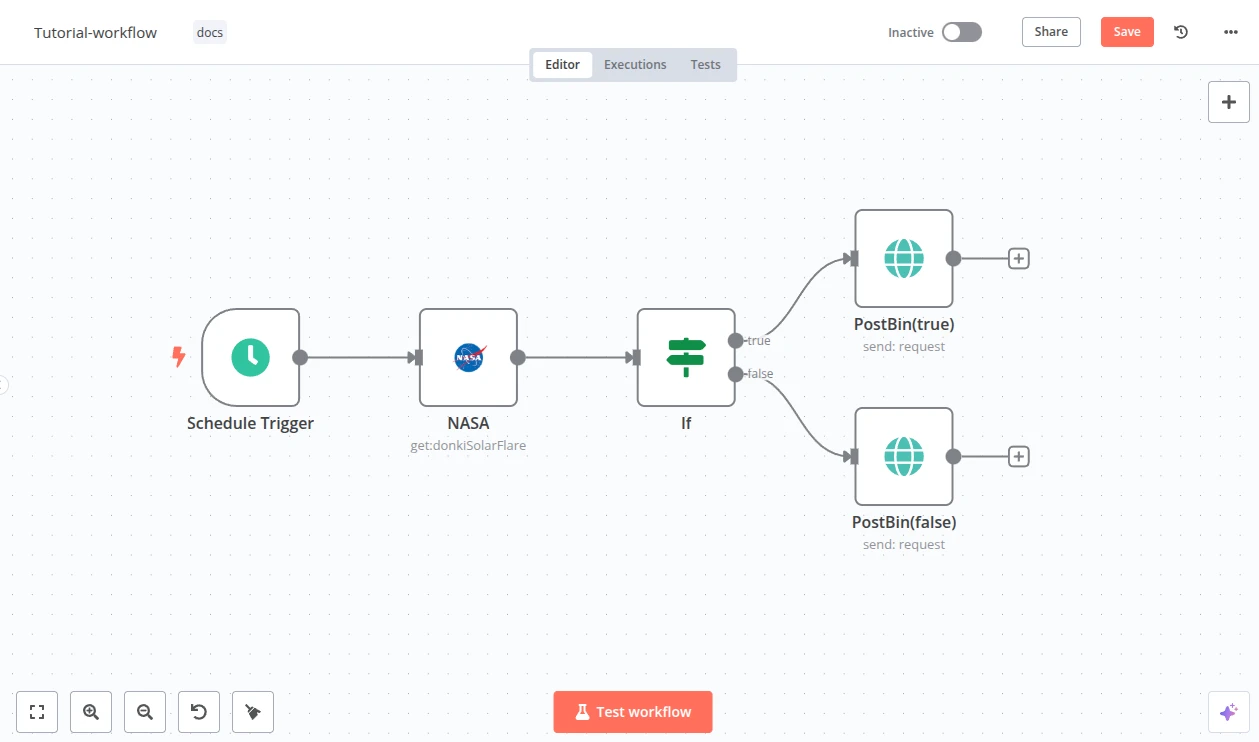
Start with a trigger, request data, branch on a condition and send the result to the appropriate action.
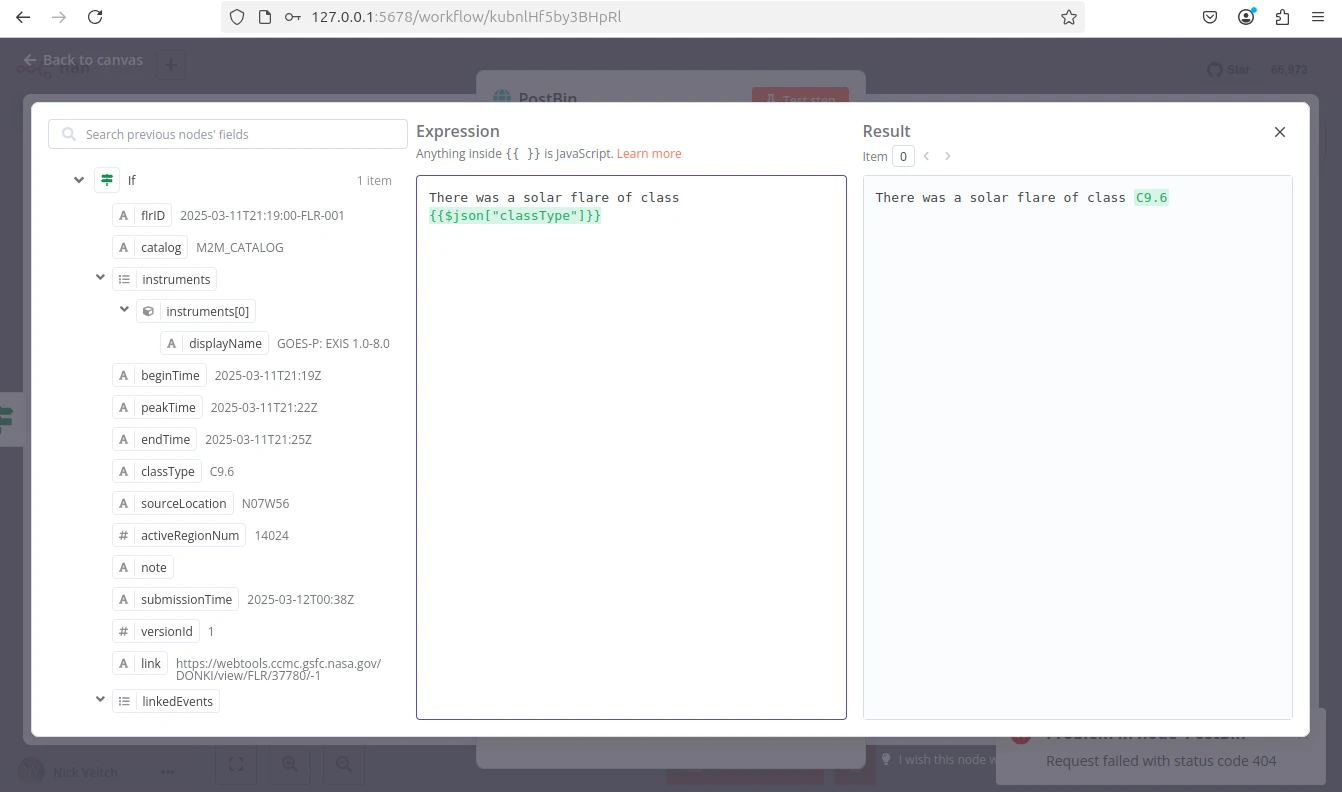
Inspect the incoming data and use expressions to pass the right value to the next step.
Screenshots: official n8n tutorial. These illustrate the tool, rather than portfolio projects built by Deepak.
Useful for beginners, freelancers and business owners who want to understand connected workflows. Bring a repeated task you would like to simplify. You will need a computer and access to the accounts used in the project. Scope, sessions, fees and tool costs are confirmed before booking.
Want an automation built for you instead? Discuss an automation build ↗
Describe a repeated task as inputs, rules and actions before opening n8n.
Understand credentials, permissions, expressions and the data each node expects.
Read execution logs and recognise missing data, failed requests and duplicate events.
Manual, scheduled and event-based starts; workflow execution.
Credentials, HTTP requests, webhooks and mapping fields.
Conditions, branches, duplicate handling, logs and monitoring.
We compare the options before selecting your setup. Accounts, subscriptions, provider approvals and ongoing costs are agreed separately.
Tell me your experience, the outcome you want and the tools or accounts you already use.
Confirm the project, session plan, fee, provider costs and what the handover will include.
Work live with me, practise between sessions and test each agreed part before moving on.
Yes. We start with one repeated task and explain triggers, data and actions before building the nodes.
We choose integrations around your workflow and the APIs available to your accounts. Some providers require paid plans or approval; we check those before agreeing the scope.
We can discuss those use cases. Production WhatsApp workflows need supported business APIs and relevant permissions. The page demos use sample data and do not send messages.
Yes. We inspect execution history, missing fields and failed connections, and discuss recovery, credentials and monitoring.
Yes, use the automation-build link to discuss the task. A done-for-you build has its own agreed scope and fee.
Start with a small workflow and understand the logic behind each node.
Map enquiries, order updates or recurring records around your existing process.
Learn to scope a useful flow, test it and explain its handover to a customer.
Receive a form, check the details, save the record and prepare the next action.
Use a sample order event to discuss status checks, records, notifications and exceptions.
Map a draft-to-review process with a human checkpoint before anything is published.
EXPLORE A PRACTICAL EXAMPLE
Select a sample enquiry. The diagram shows why a workflow should take a different path when information is missing or already processed.
Sample enquiry · email present · new record
Ready for the next action. The required fields are present.
Illustration only. No real data, message or payment is processed.
Bring a process you repeat. We map its input, rules, tools and expected outcome.
Connect the agreed nodes, inspect the data and practise the important success and failure paths.
Review activation, credentials, logs and a small change so the flow is easier to maintain.
We review the agreed project, connected accounts, testing and the next steps together. Session count, fee, deliverables and any follow-up support are confirmed before booking.
Tell me what you want to build and what you already know. We will agree the project, sessions, deliverables, fee and any tool costs before you book. Learning happens live, one-to-one; WhatsApp is for discussing the next step.
Discuss my learning project